Thinstuff iRdesktop
--:-- PM
Support Topics / Frequently Asked Questions
- Which versions of Microsoft Windows are supported?
- What about Windows Home and Starter Editions?
- How do I connect to my Windows PC or Terminal Server remotely?
- How can I enter Ctrl+Alt+Delete?
- There is no Windows Key!
- Is it possible to connect to servers using port numbers other than the default 3389?
- Can I connect to the console session?
- How do I configure my Windows XP or Vista PC for Remote Desktop?
- How can I improve slow screen updates?
- While I'm logged in remotely from the iPhone/iPod Touch my PC's console screen is locked!
- I can't hear the audio from my remote Windows PC or server on my iPhone or iPod Touch!
- How can I work with multiple servers concurrently?
- I've noticed that iRdesktop is licensed under the GPL. Where is the source?
- Where can I download iRdesktop?
- How do I perform a right-click?
- Can I do drag and drop?
- Will you release a version for the iPad?
- The keyboard is missing many keys (Esc, Funktion keys, etc.) - do you have a solution?
- I have another issue not listed here. What should I do?
 1. Which versions of Microsoft Windows are supported?
iRdesktop supports all Windows Versions that have support for Terminal Services (also known as Remote Desktop Services) out of the box.
Here is a complete list:
1. Which versions of Microsoft Windows are supported?
iRdesktop supports all Windows Versions that have support for Terminal Services (also known as Remote Desktop Services) out of the box.
Here is a complete list:
- Windows XP Home (* please see FAQ #2)
- Windows XP Professional
- Windows XP Media Center 2005
- Windows 7 Starter, Home Basic, Home Premium (* please see FAQ #2)
- Windows 7 Professional, Ultimate and Enterprise
- Windows Vista Home Basic and Home Premium (* please see FAQ #2)
- Windows Vista Business, Ultimate and Enterprise
- Windows Server 2000
- Windows Small Business Server 2003
- Windows Server 2003
- Windows Server 2008
- Windows Small Business Server 2008
- Windows Server 2008R2
2. What about the Windows Home and Starter Editions ?
In order to connect to a remote desktop using RDP the computer must have running Terminal Services (aka Remote Desktop Services).
Unfortunately Microsoft has removed Terminal Services from the Windows Starter, Home, Home Basic and Home Premium Editions.
In order to access those Windows systems with any RDP client you can install our alternative Terminal Server solution Thinstuff XP/VS Terminal Server.
3. How do I connect to my Windows PC or Terminal Server remotely?
Before doing anything else you have to configure your Windows PC for Remote Desktop:
Read FAQ #8 below. At this point you should already be able to make a connection if both your PC and your iPhone/iPod are on the same network (e.g. connected to your home wireless access point):
- Add a new server in iRdesktop and enter the address or name of your PC
- Click on the connection name
 See a video howto ...
If you also want to connect to your home PC from remote (e.g. on the way using your 3G connection or from a public internet cafe via WIFI) things get a little bit harder.
You should have some basic networking knowledge because you will have to configure some settings on your home router or wireless access point because your PC's address is probably not directly reachable from the internet.
Basically you need to configure your router or access point to redirect RDP traffic from the Internet to your home computer.
Unfortunately this task is slightly different for each router device so you will have to do some studies on your own.
Here are some very good tutorials you can follow:
Please also visit http://www.portforward.com who provide step-by-step guides on how to setup port forwarding for just about any make and model of router.
4. How can I enter Ctrl+Alt+Delete?
See a video howto ...
If you also want to connect to your home PC from remote (e.g. on the way using your 3G connection or from a public internet cafe via WIFI) things get a little bit harder.
You should have some basic networking knowledge because you will have to configure some settings on your home router or wireless access point because your PC's address is probably not directly reachable from the internet.
Basically you need to configure your router or access point to redirect RDP traffic from the Internet to your home computer.
Unfortunately this task is slightly different for each router device so you will have to do some studies on your own.
Here are some very good tutorials you can follow:
Please also visit http://www.portforward.com who provide step-by-step guides on how to setup port forwarding for just about any make and model of router.
4. How can I enter Ctrl+Alt+Delete?
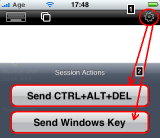 Press the gear icon in the top menu bar. This will bring up the session actions panel. Press the "Send CTRL+ALT+DEL" button.
See a video howto ...
6. Is it possible to connect to servers using port numbers other than the default 3389?
Press the gear icon in the top menu bar. This will bring up the session actions panel. Press the "Send CTRL+ALT+DEL" button.
See a video howto ...
6. Is it possible to connect to servers using port numbers other than the default 3389?
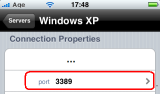 Yes, just select the corresponding entry in the connection properties.
7. Can I connect to the console session?
Yes, just select the corresponding entry in the connection properties.
7. Can I connect to the console session?
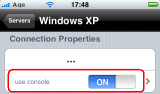 Yes, just select the corresponding entry in the connection properties.
8. How do I configure my Windows XP or Vista PC for Remote Desktop?
In order to be able to connect to your PC using iRdesktop or any other RDP client you have to enable Remote Desktop Services first.
Yes, just select the corresponding entry in the connection properties.
8. How do I configure my Windows XP or Vista PC for Remote Desktop?
In order to be able to connect to your PC using iRdesktop or any other RDP client you have to enable Remote Desktop Services first.
Please consult the following Microsoft guides:
For Windows XP:
Get started using Remote Desktop with Windows XP Professional
For Windows Vista:
Allow someone to connect to your computer remotely
For Windows 7:
Connect to another computer using Remote Desktop Connection
9. How can I improve slow screen updates?
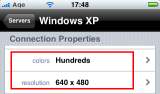 Slow screen updates are mostly caused by slow network connections. So first please make sure that you have 3G and WIFI enabled!
In order to speed up slow connections like EDGE you can try to set the amount of colurs to "Hundreds" and the resolution to "640x480".
10. While I'm logged in remotely from the iPhone/iPod Touch my PC's console screen is locked!
Right. The reason for is that for Windows workstations Microsoft only allows one single person to work interactively with the system at a time.
If you want to have multiple concurrent rdp connections without being locked out from the console you can try our alternative Terminal Server solution Thinstuff XP/VS Terminal Server.
11. I can't hear the audio from my remote Windows PC or server on my iPhone or iPod Touch!
Correct. iRdesktop currently does not have support for audio redirection.
12. How can I work with multiple servers concurrently?
This works exactly as you probably know it from your Safari browser!
- Within a running session press the Windows button in the top toolbar. This will bring up the page view.
- In order to connect to another server in parallel select the Bookmarks button in the bottom toolbar. This will bring up the favorites chooser.
- Select the server you want to connect to
- Press the Windows button again to switch to another session
See a video howto ...
13. I've noticed that iRdesktop is licensed under the GPL. Where is the source?
Please follow this link to get your copy of the current version's source code.
14. Where can I download iRdesktop?
 On May, 1st 2009 Apple has accepted iRdesktop for inclusion in the App Store!
You can download it directly from your iPhone / iPod touch or from within iTunes.
15. How do I perform a right-click?
To perform a right click, just tap and hold without releasing for almost one second.
16. Can I do drag and drop?
Yes. The gesture is identical to a drag and drop operation using a notebook mouse pad.
On May, 1st 2009 Apple has accepted iRdesktop for inclusion in the App Store!
You can download it directly from your iPhone / iPod touch or from within iTunes.
15. How do I perform a right-click?
To perform a right click, just tap and hold without releasing for almost one second.
16. Can I do drag and drop?
Yes. The gesture is identical to a drag and drop operation using a notebook mouse pad.Double click but don't release your finger on the second tap. Hold your finger down, move it to the desired drop position and release it.
17. Will you release a version for the iPad?
Yes. Before end of Q4/2010.
18. The keyboard is missing many keys (Esc, Funktion keys, etc.) - do you have a solution?
Currently you can only simulate the missing keys using Window's own on-screen Keyboard:
See http://www.microsoft.com/windowsxp/using/accessibility/oskturnonuse.mspx We are aware that using this solution might be a bit inconvenient.
However, we plan to include more special keys in future versions (not before 2011).
19. I have another issue not listed here. What should I do?
iRdesktop is provided free of charge and we hope that you understand, that we cannot provide intensive direct support.
Therefore it would be greatly appreciated if you read this FAQ again.
Do yourself a favour and read the Wikipedia article about Remote Desktop Services.
This will help you to better understand the whole topic!
We are pretty sure that your questions are also answered in any of the following pages:
- MS: Get started using Remote Desktop with Windows XP Professional
- MS: Frequently Asked Questions About Remote Desktop in Windows XP
- MS: Windows Vista: Allow someone to connect to your computer remotely
- MS: Windows Vista: Troubleshoot Remote Desktop problems
- MS: KB186645: Troubleshooting RDP Client Connection Problems
[ Impressum ]